
Black Friday 2026 falls on November 27 and Cyber Monday on November 30. Most shops put the sale link on flyers and in emails days before the sale. The trouble starts on December 1, when the same link still promises a deal that has ended.
A scheduled short link fixes that. You share one link everywhere, and it opens the sale page only during the dates you set. Before and after those dates, Capsulink smart links send people to your regular page.
How does a short link with an end date work?
A Capsulink smart link holds a default destination plus one or more extra destinations, called smart URLs, each with its own rules. Capsulink’s help article on smart links explains the fallback: when none of the rules apply, the visitor goes to the default URL.
For a sale, the default URL is your normal product or category page. The smart URL is the sale page, with a time rule set to the sale dates. Outside those dates no rule matches, so people land on the normal page.
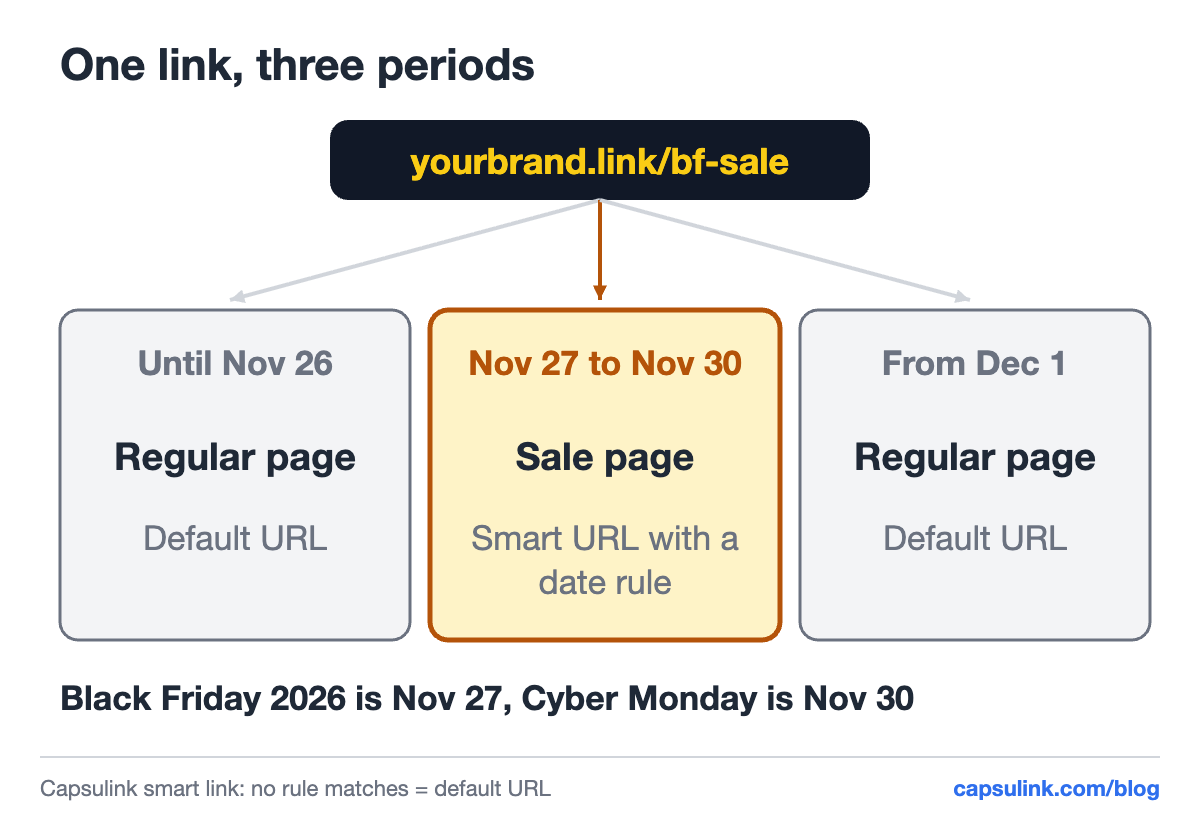
Before, during and after the sale, the same link opens a different page
The printed link and the QR code never change. Only the page behind them does.
How to schedule a sale link in Capsulink
- Create a short link to the regular page. This becomes the default URL. A clear ending such as
/bf-salehelps people remember it. - Open the link menu and choose Add Smart URL. Paste the sale page address.
- Add a time rule. The rule has a date range plus a weekly grid of days and hours. For Black Friday through Cyber Monday, set the dates to November 27 to November 30.
- Check the time zone in the time and date settings. A sale that ends at midnight in New York ends at 7:00 in Riga the next morning, so pick the zone your offer is written for.
- Save, then open the link yourself. You should see the regular page today and the sale page once the range starts.
Smart links are part of the paid plans, starting with Pro at $10 a month. The targeting article covers the other rule types, such as country, language and device.
Can the link change every day, not just once?
Yes. The weekly grid inside the time rule lets you pick hours on specific days. A cafe can run a “happy hour” offer from 17:00 to 19:00 on weekdays, and a shop can show a flash deal only on Friday evenings.
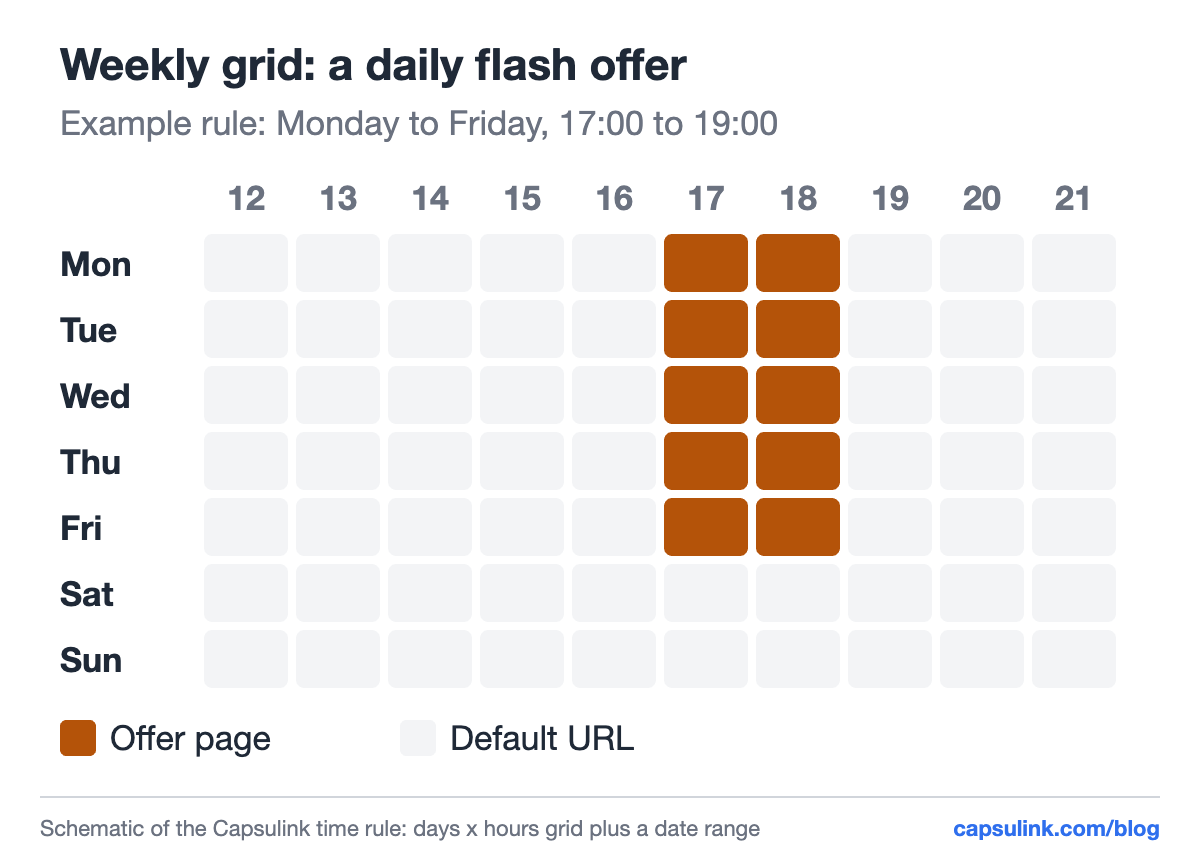
The weekly grid in a time rule can repeat an offer at set hours
Rules can also be combined. Capsulink groups work with AND between groups and OR inside a group, so “Germany AND Friday evening” is possible. The restaurant menu QR post shows the same grid used for breakfast, lunch and dinner menus.
Where does a scheduled link help most?
Anywhere you can’t take the link back once it is out:
- Printed flyers, posters and in-store signs with a QR code.
- Emails, which people open days or weeks after they arrive.
- Social bio links and pinned posts that stay up longer than planned.
- Influencer posts and podcast reads you don’t control after they go live.
- SMS campaigns, where a dead link costs you the whole message.
For links in the bio, the same trick works with a Capsulink Bio page: the button stays the same while the destination follows the calendar.
What about price rules for the sale page itself?
The link only decides which page opens. What the page says still has to follow the law where you sell. In the EU, Article 6a of the Price Indication Directive says any announced price reduction must show the prior price. It defines the prior price as “the lowest price applied by the trader during a period of time not shorter than 30 days” before the reduction.
So a “50% off” banner needs the right reference price on the page. A scheduled link helps with the other half of honesty: it stops showing the deal once the deal is over.
How to test the link before the sale starts
You can’t wait until Friday to find a mistake. Two quick checks:
- Make a copy of the link with a time rule for the next hour. Open it inside that hour and after it. If both pages appear as planned, the real link will behave the same way.
- Look at the click stats on the day the sale starts. Capsulink counts every click on the short link, so a sudden drop to zero is a sign of a problem with the page or the rule. The statistics article shows what each plan includes.
If you want to compare two sale pages during the same dates, add two smart URLs and split traffic between them, as described in A/B testing landing pages with one link.
FAQ
Can I make a link expire after a date?
In Capsulink you don’t switch the link off. You add a smart URL with a date range, and after the range ends the link sends people to the default URL. That keeps old flyers and emails working instead of showing an error.
Does a scheduled link work with a QR code?
Yes. The QR code holds the short link, so it follows the same rules. Print it once and the page behind it changes on schedule.
What time zone does the rule use?
Set it in the time and date settings of the rule. Check it before every sale, especially if you sell across several countries.
Is this available on the free plan?
No. Smart links and editing the destination start with the Pro plan. The free Starter plan keeps the destination fixed.