
A QR code has no single correct size. Its printed width is the number of modules (the small squares) plus a 4-module quiet zone on each side, times the size of one module. For codes scanned at a store checkout, GS1 sets the module size at 0.396 to 0.990 mm. Using that range as a guide, a short link code comes out between about 13 and 37 mm wide.
Most people pick the size by eye and find out at print time that the code is too dense for cheap paper. The fastest way to get a smaller, easier code is to put less text inside it. Below are real sizes, measured, for long URLs, short links and an uppercase trick most guides skip.
How do you work out the size of a QR code?
Every QR code is a square grid. DENSO WAVE, the company that created the QR code, defines 40 versions, from 21 x 21 modules (version 1) to 177 x 177 modules (version 40). The standard also needs a quiet zone, a blank margin 4 modules wide on every side.
So the printed width is:
(modules across + 8) x module size = printed width
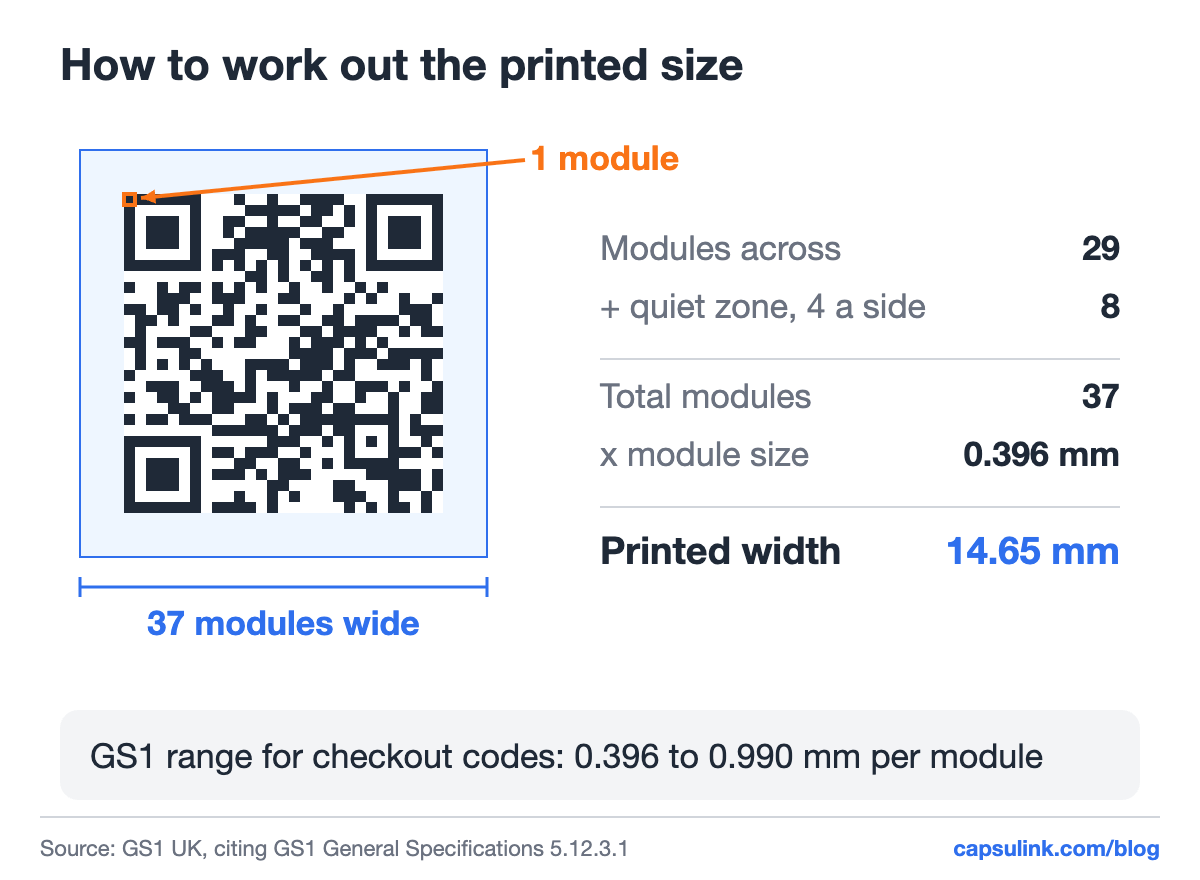
Modules plus quiet zone, times the module size
GS1 UK gives the same example in its guide How big should a QR code powered by GS1 be?: a 29-module code at the smallest X-dimension of 0.396 mm comes to 14.652 mm, quiet zone included. The 0.396 to 0.990 mm range comes from the GS1 General Specifications, section 5.12.3.1, and applies to codes scanned at retail checkout.
How big is a QR code for a long URL vs a short link?
The number of modules depends on how much text the code holds. Capsulink measured five links on 2026-11-28 with the segno library at error correction level M, then worked out the printed width at three module sizes:
| Link inside the code | Characters | Modules | At 0.396 mm | At 0.5 mm | At 0.99 mm |
|---|---|---|---|---|---|
| Blog URL with UTM tags | 117 | 45 x 45 | 21.0 mm | 26.5 mm | 52.5 mm |
| Blog URL, no tags | 58 | 33 x 33 | 16.2 mm | 20.5 mm | 40.6 mm |
| GS1 Digital Link with GTIN | 43 | 33 x 33 | 16.2 mm | 20.5 mm | 40.6 mm |
| Short link https://cli.re/blog-demo-qr | 27 | 29 x 29 | 14.7 mm | 18.5 mm | 36.6 mm |
| Same short link in UPPERCASE | 27 | 25 x 25 | 13.1 mm | 16.5 mm | 32.7 mm |
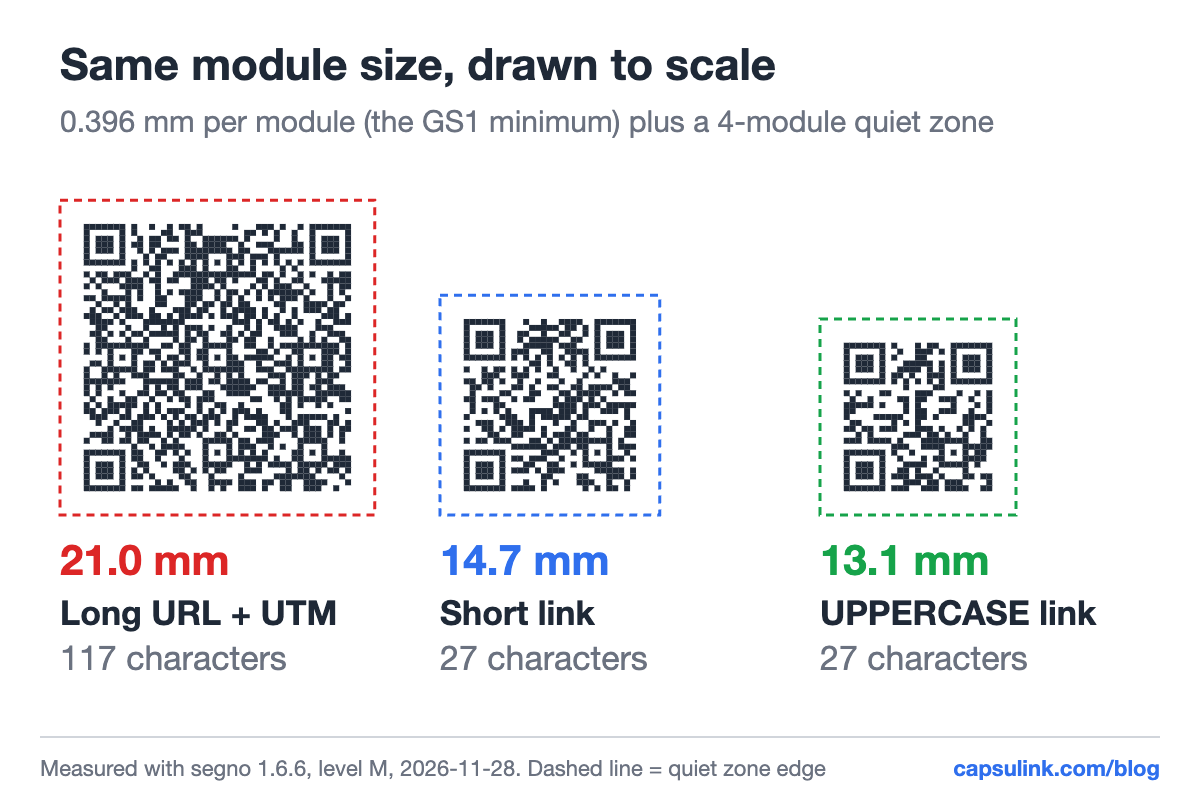
Three codes at the same module size, drawn to scale (measured 2026-11-28)
At the same module size, the UTM link needs a code 60% wider than the uppercase short link (21.0 vs 13.1 mm). Turn it around and the gain is bigger dots: in the same 21 mm space, the short link’s modules can be about 1.6 times larger, which is easier for an old phone or a scan from further away.
Why does an uppercase link make a smaller QR code?
QR codes have an alphanumeric mode that stores characters more compactly than the normal byte mode. It only covers digits, capital letters, the space and eight symbols: $ % * + - . / :. A lowercase letter, a ?, an = or an _ forces the whole code into byte mode.
GS1 UK mentions the same tip: “Using uppercase letters in QR codes can make your QR code smaller.” In the measurement above, HTTPS://CLI.RE/BLOG-DEMO-QR dropped from version 3 to version 2.
Two things have to be true for this to work:
- The whole URL must fit the alphanumeric set. A URL with UTM tags has
?,=and_, so it can’t use this mode. A short link can, because the tags sit in the long URL behind it. - The link must still open when typed in capitals. The scheme and domain are case-insensitive by the URL standard. For the path, Capsulink tested its own links on 2026-11-26:
cli.re/BLOG-DEMO-QRopened the same page as the lowercase version.
Scan the uppercase code with a few different phones before printing, as with any code.
What size for posters, flyers and menus?
The GS1 range is written for checkout scanners. It doesn’t cover phones scanning a poster, a table card or a flyer, and there is no official minimum for those. What helps in practice:
- Bigger modules help more than a bigger code with more data. Put less text in the code first, then decide the size.
- Keep the full quiet zone. A frame, a border or text pushed against the code can stop it from scanning.
- Print a test at real size and scan it from the real distance: arm’s length for a menu, a few metres for a poster.
The restaurant menu QR guide has a print checklist, and QR code on a business card compares a vCard code with a short link code at small sizes.
How to make a small QR code with Capsulink
- Create a short link to your page. Put UTM tags on the long URL, not in the code. The UTM parameters guide has the naming rules.
- Pick a short ending with letters, digits and dashes only, like
/menuor/winter-26. - Download the QR code from the link page as SVG or PNG. SVG stays sharp at any print size. The QR code help article shows where it is.
- If you need the smallest possible code, create it in your design tool from the uppercase version of the link and test it.
On a paid plan you can also change where the code points after printing. See how to edit a QR code after it is printed.
FAQ
What is the minimum size for a QR code?
For retail checkout, GS1 sets the smallest module at 0.396 mm, so a 29-module code with its quiet zone is 14.652 mm wide. For other uses there is no official minimum: test at the real print size and distance.
Does a shorter link make a smaller QR code?
Yes. In Capsulink’s test a 117-character URL needed 45 x 45 modules, and a 27-character short link needed 29 x 29.
Does the quiet zone count in the size?
It should. The blank margin is 4 modules on each side, so add 8 modules to the width before you multiply by the module size.
Will an uppercase short link still work?
For Capsulink links, yes: a test on 2026-11-26 showed the uppercase ending opens the same page. Other services may treat the path as case-sensitive, so test first.