
Link rot is what happens when a link keeps existing but the page behind it doesn’t. Pew Research Center checked almost a million webpages and found that 38% of pages from 2013 were no longer accessible in October 2023 (When Online Content Disappears, May 17, 2024). Even 8% of pages collected in 2023 were already gone. Every link you publish is on the same clock.
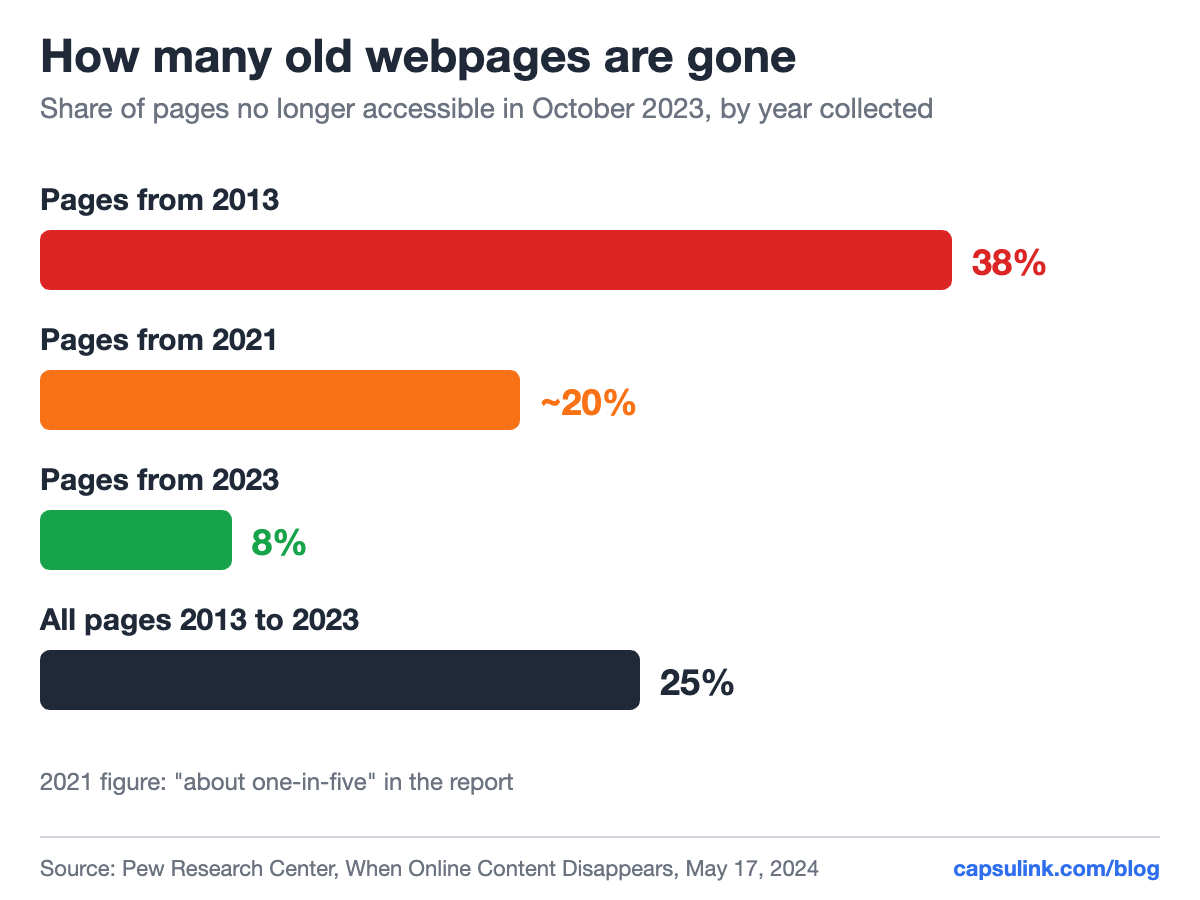
The older the page, the more likely it is gone.
How common broken links are
Pew counted a page as inaccessible only when it returned one of nine error codes that clearly mean the page or its server no longer exists, such as a “404 Not Found”. So the numbers are a conservative estimate.
| What Pew checked | Finding |
|---|---|
| All pages from 2013 to 2023 | 25% no longer accessible |
| Pages from 2013 | 38% no longer accessible |
| News webpages | 23% have at least one broken link |
| Government webpages | 21% have at least one broken link |
| Wikipedia pages | 54% have a broken reference link |
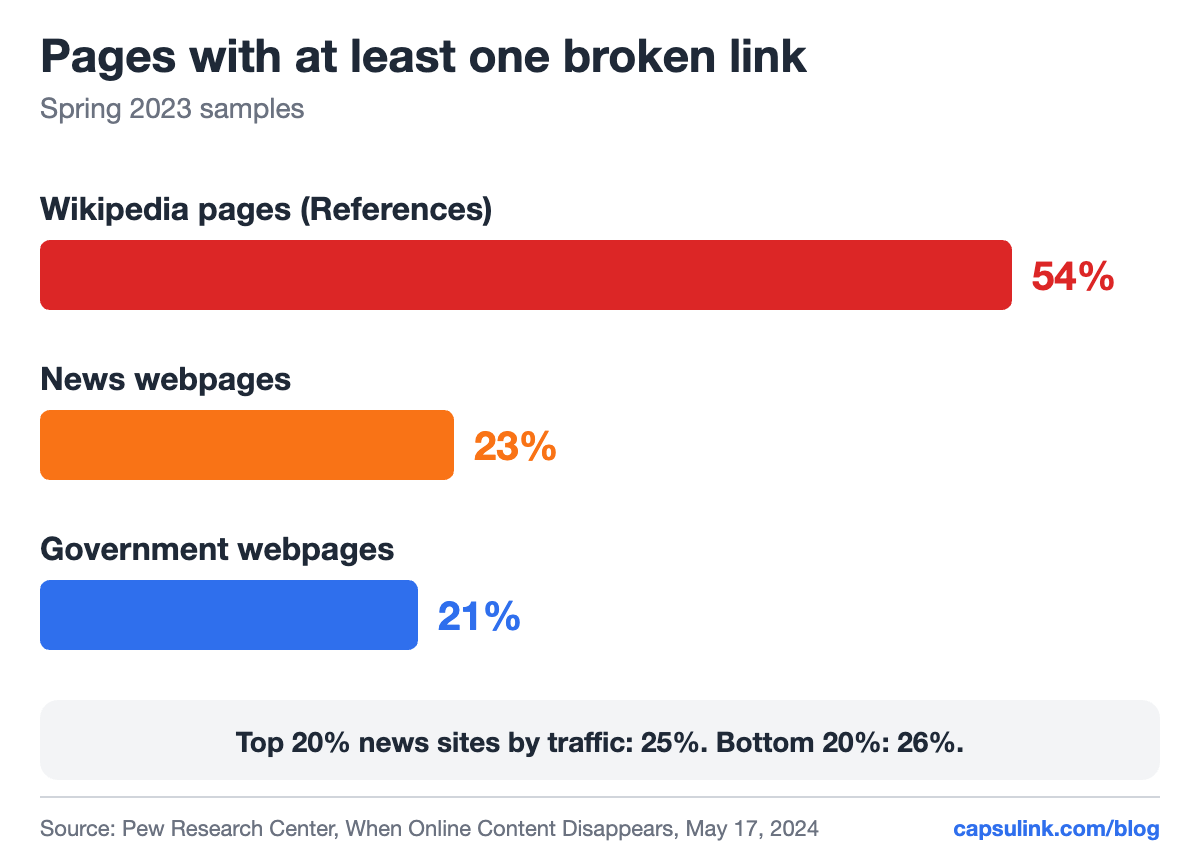
Broken links on news, government and Wikipedia pages, spring 2023.
Big sites are not safer. Pages on the top 20% of news sites by traffic had a broken link 25% of the time, the bottom 20% had 26%.
Why links break
Pew found that most lost pages were deleted or removed from a website that still works. Of the 25% of pages that were gone, 16 points were single pages missing from a working domain, and 9 points came from domains that no longer worked at all. Common ways a page goes missing:
- A site redesign changes the URL structure and nobody adds redirects.
- A product or campaign ends and its page is deleted.
- A file moves, like a PDF price list replaced by a new one under a new name.
- A domain expires or a company closes.
- A service shuts down. Google switched off goo.gl links with no activity in late 2024, see goo.gl links in 2026.
Fix the links you control
On your own website, every URL you retire needs a redirect to the closest live page. A 301 redirect tells browsers and search engines the move is permanent. Before a redesign, export the list of old URLs, and after launch, check that each one still lands somewhere useful.
Links you already shared are harder. A URL printed on a flyer, written in a YouTube description or sent in last year’s newsletter can’t be edited. A short link can.
Use short links for anything you can’t edit later
When a short link goes into print, video or email, the published copy only holds the short link. If the page behind it moves, change the short link’s destination once and every copy follows (How do I change the destination URL (Target URL) for a short link?). In Capsulink, changing destinations comes with Pro and higher plans.
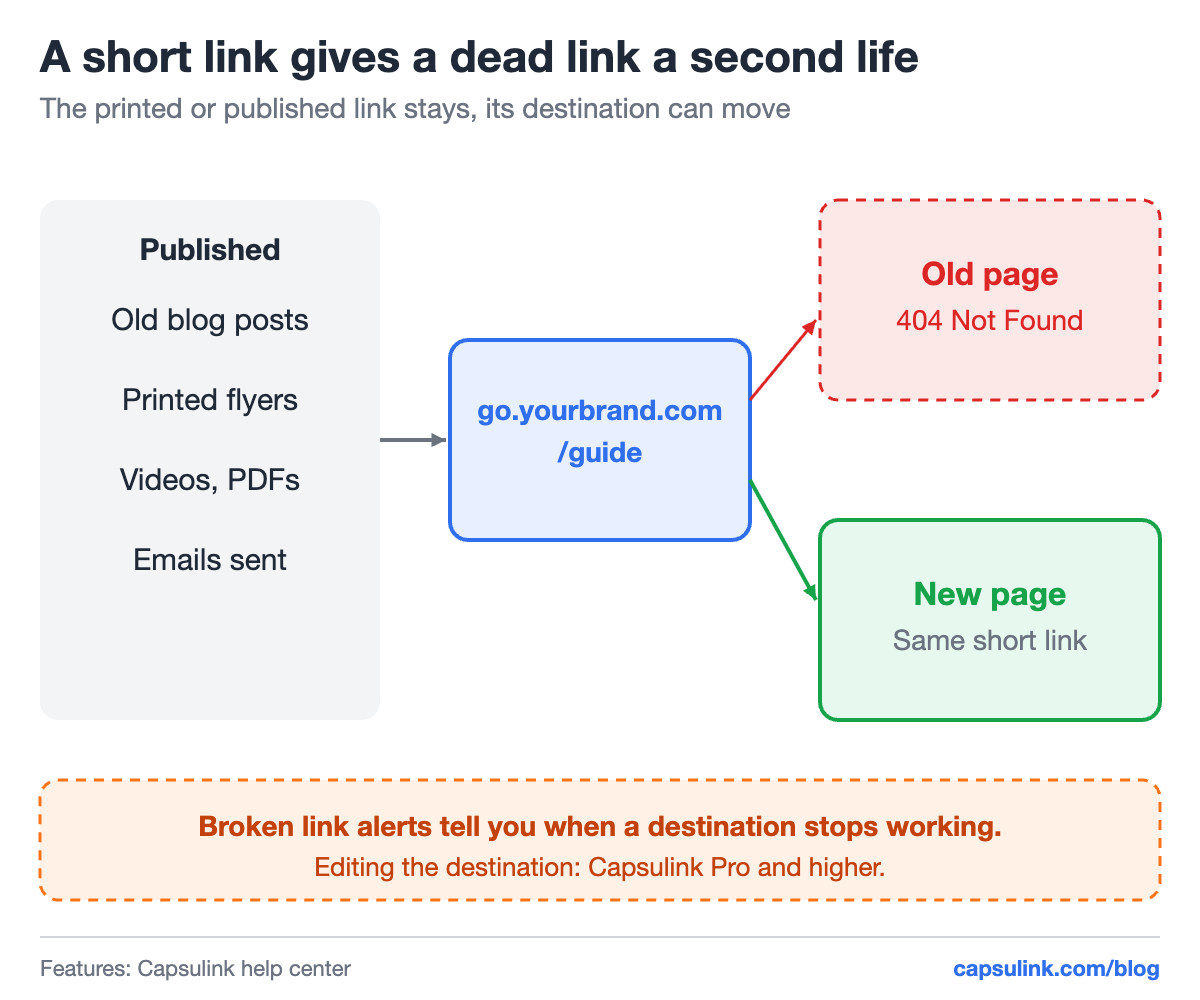
The published link stays. Only its destination changes.
Capsulink also sends broken link notifications when a destination stops working, and that is part of every plan, including the free Starter plan (Starter (free) plan features and limitations). The alert reaches you before a reader does.
Two more habits help:
- Use a domain you control for short links. If a shortening service ever stops, links on your own domain can be pointed elsewhere. See the custom short domain setup guide.
- Set a 404 redirect on that domain. A mistyped or deleted short link then lands on your homepage instead of an error.
QR codes are the clearest case, since a printed code can’t be fixed at all once it points to a dead page. See how to edit a QR code after printing.
Check old content for broken links
Pew found a median of 20 outside links on a news page and 50 links on a government page. On a blog with years of posts, broken outside links pile up quietly. A yearly check of the most visited old posts covers the pages readers actually see. For your own short links, the click statistics show which old links still get traffic and are worth fixing first (How to view and export your link statistics).
FAQ
What is link rot?
Link rot is when a link points to a page that no longer exists or no longer loads. Pew Research Center found that 25% of webpages from 2013 to 2023 were no longer accessible in October 2023.
How do I fix a broken link I already shared?
If the shared link is a short link, change its destination to a working page. If it is a direct URL on your own site, add a redirect from the old URL to the new page.
How can I find out when a link breaks?
Capsulink sends broken link notifications when a short link’s destination stops working, on every plan including the free one.