
A static QR code stores the destination URL itself in its black and white squares. A dynamic QR code stores a short link, and the short link forwards each scan to the destination. Printed, the two look the same. The difference shows up later, when the page moves, the campaign ends or someone asks how many people scanned the flyer.
The short version: print a dynamic QR code for anything that might change or needs tracking, and a static one for data that never changes.
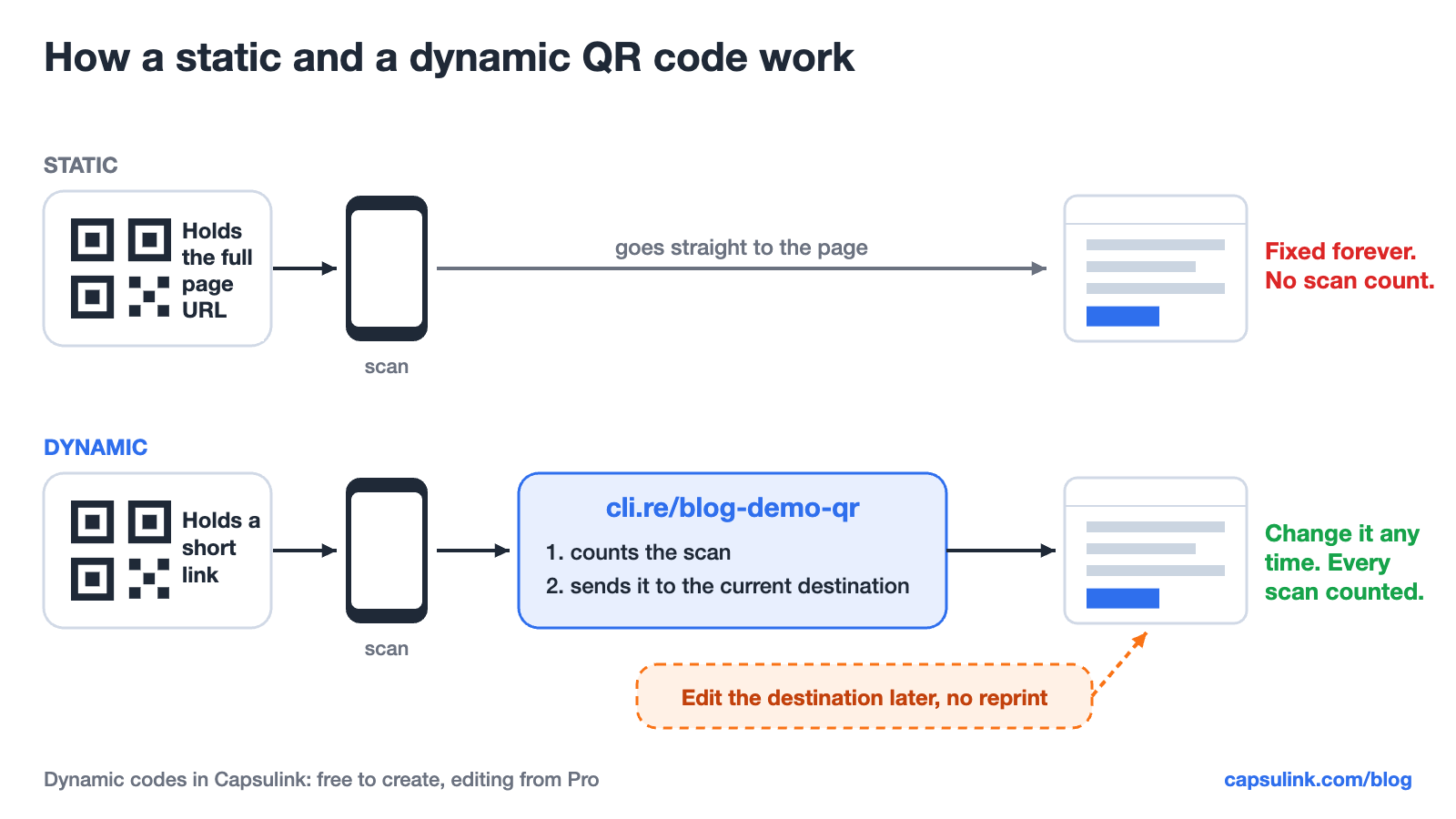
A static code goes straight to the page. A dynamic code passes through a short link first, which counts the scan and decides where to send it.
Dynamic vs static QR codes at a glance
| Feature | Static QR code | Dynamic QR code |
|---|---|---|
| Change destination after printing | No | Yes |
| Scan tracking | No | Yes |
| Code density for long URLs | High | Low |
| Works without a link service | Yes | No |
| Can hold Wi-Fi or plain text | Yes | No, links only |
| Best for | Wi-Fi, plain text, fixed pages | Menus, flyers, packaging, ads |
What is a static QR code?
A static QR code holds the data directly. Scan it and the phone reads the full URL, Wi-Fi details or text from the squares, with no server in between. Nothing can change that data once it is printed, and nobody can count the scans, because no service sees them.
That makes static codes fine for things that never change, such as a Wi-Fi network in an office or a link to a page that will stay where it is for years.
What is a dynamic QR code?
A dynamic QR code holds a short link, for example cli.re/blog-demo-qr. When someone scans it, the link service records the scan and forwards the visitor to the current destination. The owner can change that destination at any time, and the printed code keeps working.
Two things come with it. Every scan shows up in the link’s statistics, with country, device and time. And the destination can move from a winter sale page to a spring one without printing anything new.
Why a short link makes the code easier to scan
A QR code grows with the amount of data in it. DENSO WAVE, the company behind the QR code, lists 40 versions, from 21 x 21 modules in version 1 up to 177 x 177 in version 40. More modules on the same printed area means smaller squares, and small squares are harder for cameras to read from a distance or in poor light.
Capsulink measured two codes for the same page with error correction level M, the level DENSO WAVE says is selected most often:
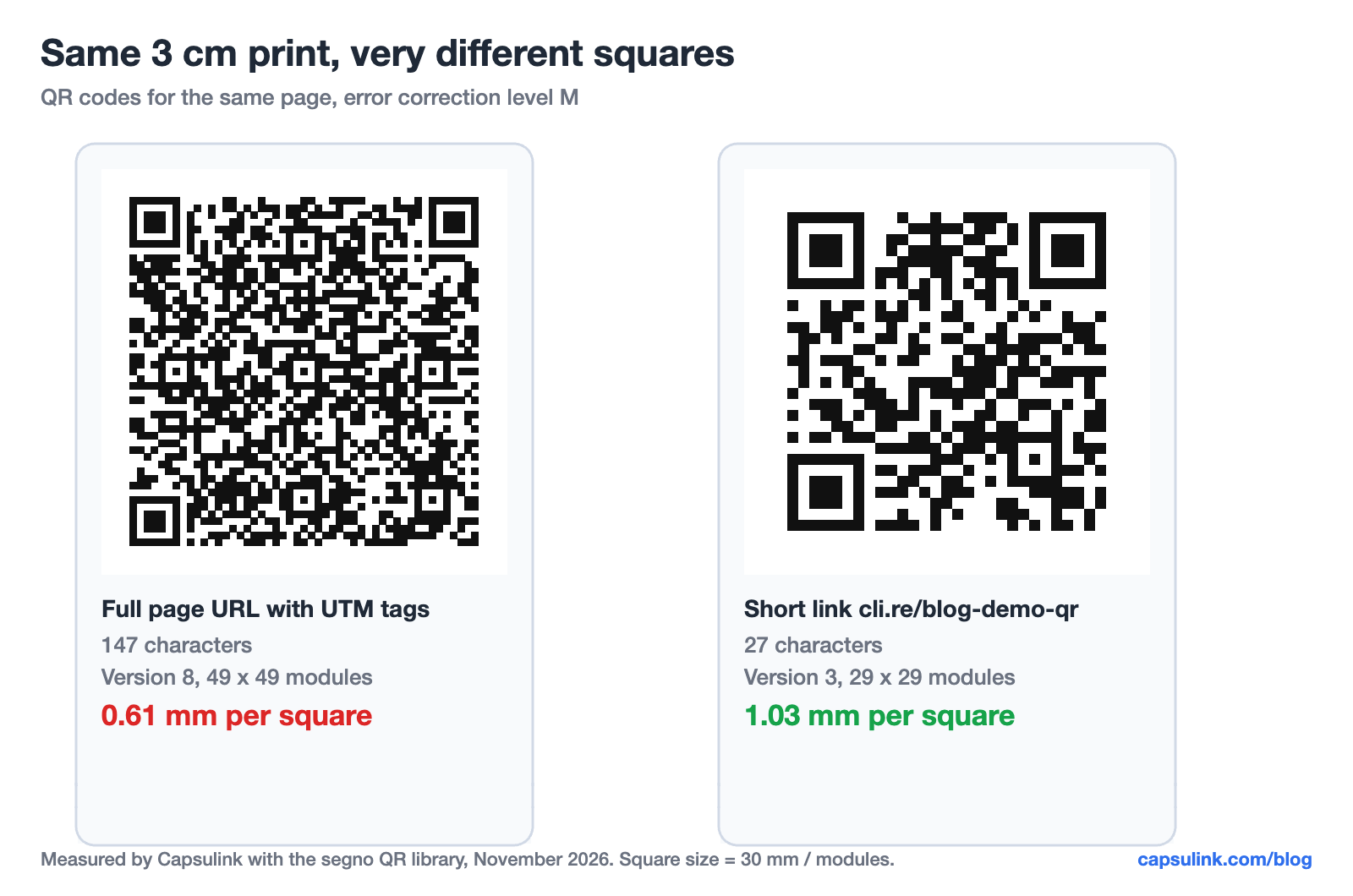
Both codes open the same page. The right one is the real QR code of cli.re/blog-demo-qr, so it can be scanned from the screen.
| Code content | Characters | QR version | Modules | Square at 3 cm |
|---|---|---|---|---|
| Page URL with UTM tags | 147 | 8 | 49 x 49 | 0.61 mm |
| Short link cli.re/blog-demo-qr | 27 | 3 | 29 x 29 | 1.03 mm |
At the same print size the short link gives squares about 1.7 times bigger. The gap grows with every UTM tag added to the long URL, because the short link stays 27 characters no matter how long the destination is.
Which one to print, by use case
| Use case | Pick | Why |
|---|---|---|
| Restaurant menu | Dynamic | Prices and dishes change every season |
| Product packaging | Dynamic | Boxes stay on shelves for months |
| Flyer or poster campaign | Dynamic | Scan counts show if the print paid off |
| Event badge or ticket | Dynamic | Agenda links change up to the last day |
| App download | Dynamic | One code sends iPhones and Android phones to their own store |
| Office Wi-Fi card | Static | Wi-Fi details can’t go through a link |
| Business card with vCard | Static | Contact data is stored in the code itself |
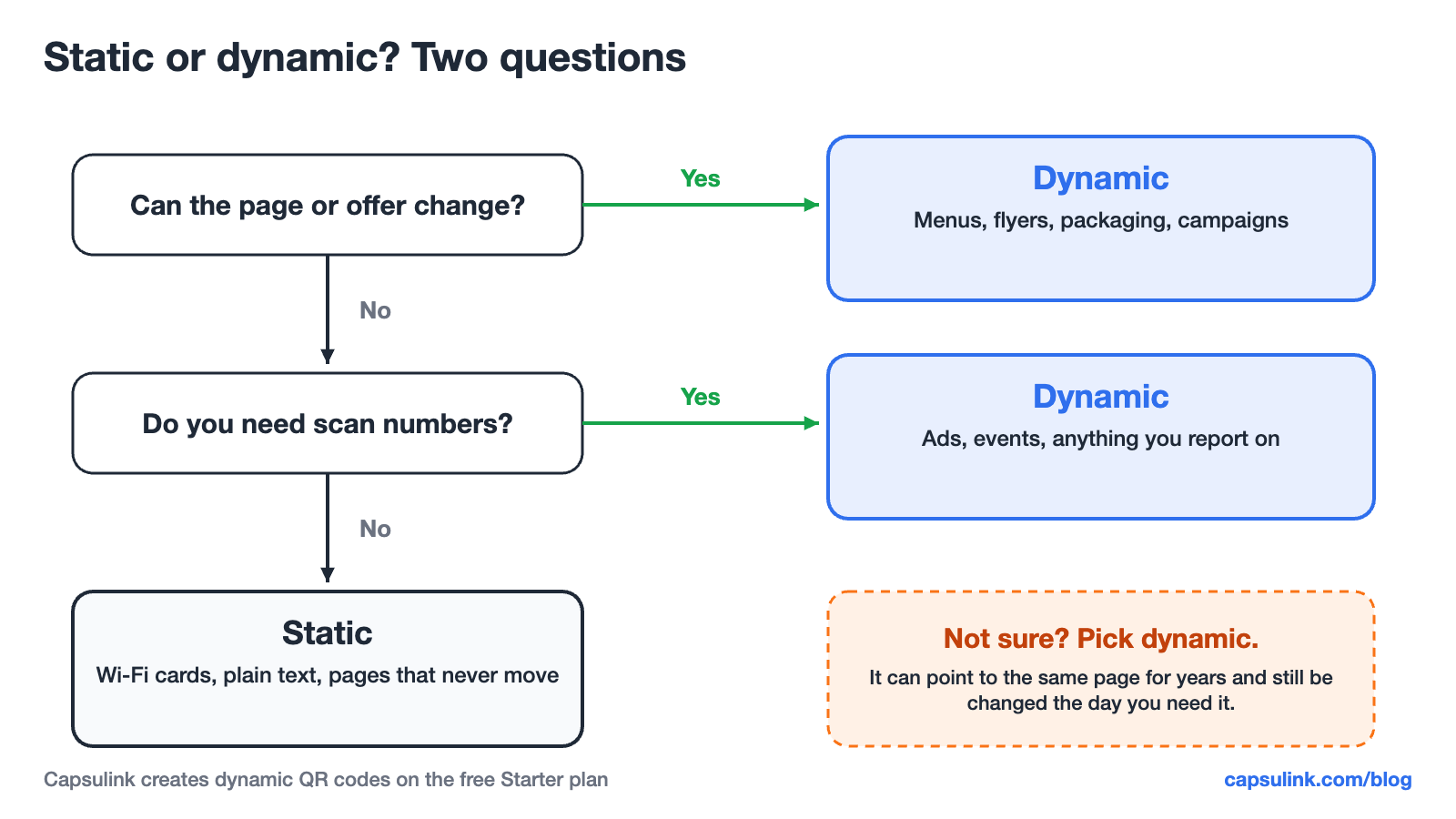
When in doubt, dynamic is the safer choice.
The one risk of a dynamic QR code
A dynamic code works only as long as its link service keeps the short link alive. In August 2025 Google switched off every goo.gl link that had shown no activity in late 2024, printed ones included (Google Developers Blog). Two habits lower that risk. Pick a service whose links don’t expire (Capsulink links never expire, and TinyURL’s Bulk plan expires links after 90 days by default). And put the short links on your own domain, so they can move to another service later.
More on the goo.gl case in goo.gl links in 2026, and on moving between services in Bitly alternatives in 2026.
How to make a dynamic QR code in Capsulink
The steps from the Capsulink help center (How to generate QR codes for short links):
- Paste the page URL into Capsulink, pick a short domain such as cli.re and click “Capsulate”.
- Give the link a readable ending if you like, for example blog-demo-qr.
- Download the QR code as PNG or SVG. SVG is vector and stays sharp on large prints.
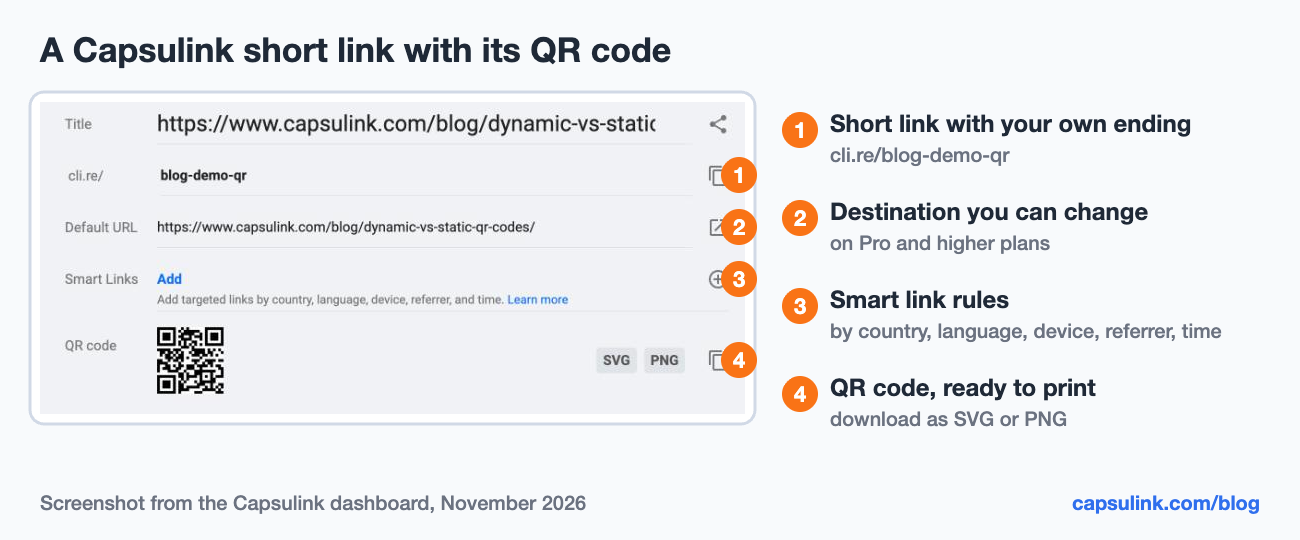
Everything on one screen: the short link, the destination, smart link rules and the QR code download.
Capsulink starts counting scans right away. QR codes and scan stats are on the free Starter plan. Changing the destination after printing needs Pro at $10 a month (Capsulink pricing). The full steps for that are in How to edit a QR code after it is printed, and scan counting is covered in How to track QR code scans.
Print rules that apply to both
Leave white space around the code. DENSO WAVE asks for a margin four modules wide on every side, and a code printed without it can fail to scan. Then pick the error correction level on purpose:
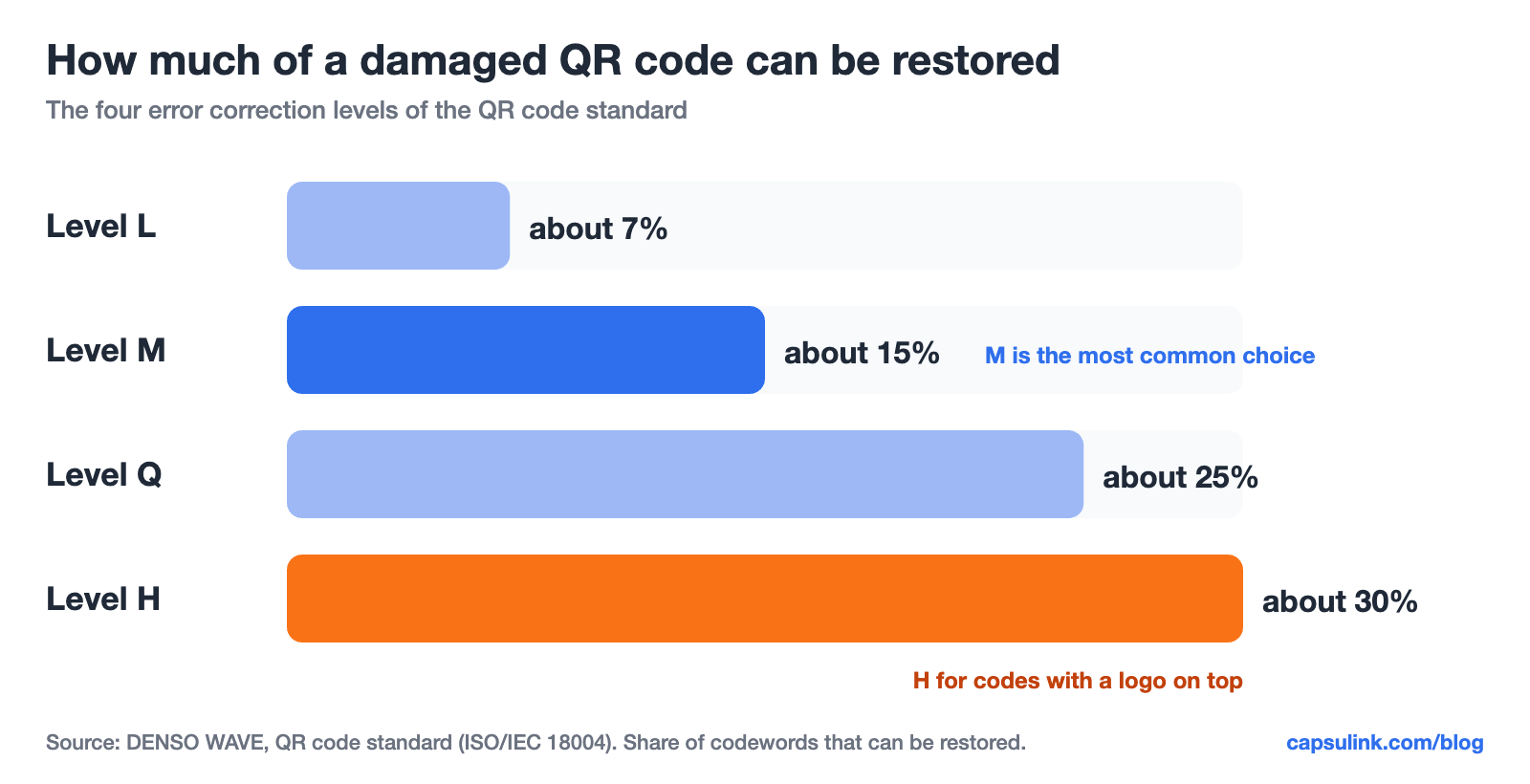
Higher levels survive more damage but need more modules for the same data.
H is the usual choice when a logo covers the middle of the code. It also makes the code denser, which is one more reason to keep the content short.
A short checklist before sending a QR code to print:
- Test the printed proof with an iPhone and an Android phone, at the distance people will really scan from.
- Keep dark modules on a light background, the way the QR standard draws them.
- Use SVG for anything larger than a flyer.
- Write the short link under the code, so people without a camera app can type it.
Why a QR code doesn’t scan
| Problem | Fix |
|---|---|
| Squares too small | Print bigger or shorten the content with a short link |
| No white margin | Leave four modules of empty space on every side |
| Low contrast | Dark code on a light background |
| Logo covers too much | Use level H and a smaller logo |
| Link opens an error | Check the destination, and for a dynamic code change it in the link service |
FAQ
Do dynamic QR codes expire?
They stop working when the short link stops working. Capsulink links never expire. Some services expire links on certain plans, for example TinyURL Bulk after 90 days by default.
Can a static QR code be tracked?
Not by the code itself. If it points to your own site with UTM tags in the URL, your website analytics can count the visits, but the scans of people who don’t open the page stay invisible.
Is a dynamic QR code free?
Capsulink Starter creates QR codes with scan tracking for free. Bitly Free allows 2 QR codes a month, and Rebrandly Free 10 a month with a watermark. Editing the destination is a paid feature on all of them.
Can I turn a static QR code into a dynamic one?
No. The printed data can’t change. A new code with a short link has to be printed in its place.
Are dynamic QR codes safe?
The code only opens a link. Capsulink blocks short links that lead to phishing or malware, and a short link on your own domain shows people who the link belongs to before they open it.